Understanding Google Tag Manager
Google Tag Manager, or how to stop filing tickets with the developer
Understand Google Tag Manager without being a developer: what the tool does, what it does not do, how to set it up right the first time, and why half of all containers end up unreadable.
Google Tag Manager is a middleman. You place one piece of code on your site, once, and from then on you steer every measurement and advertising tool from a single interface without touching the site again. It is neither an analytics tool nor a consent tool: it is a switchboard. Set up well, it saves you months. Set up badly, it becomes a black box nobody dares open.
Contents
The problem nobody talks about any more
Before 2012, adding a measurement tool to a website was a negotiation.
Marketing wanted to try something. That meant filing a ticket, sending it to engineering, waiting for the next release, discovering the code had landed on one page instead of all of them, filing another ticket. Three weeks for one line of JavaScript. By then the campaign was over.
The result was web pages that piled up layers. A forgotten counter, an advertising pixel from an agency that left two years ago, a chat tool nobody used any more. Nobody dared remove anything, because nobody remembered what any of it did.
On 1 October 2012, Google announced Tag Manager, under a blog post title that says everything about the intent: “Digital marketing made (much) easier”. The idea fits in one sentence: place one piece of code on the site, once, and handle everything else somewhere else.
What the tool actually does
Google Tag Manager measures nothing.
I repeat it because it is the most common misreading, and an expensive one: people install Tag Manager, wait, and wonder why no numbers appear anywhere. That is normal. There are no numbers to see.
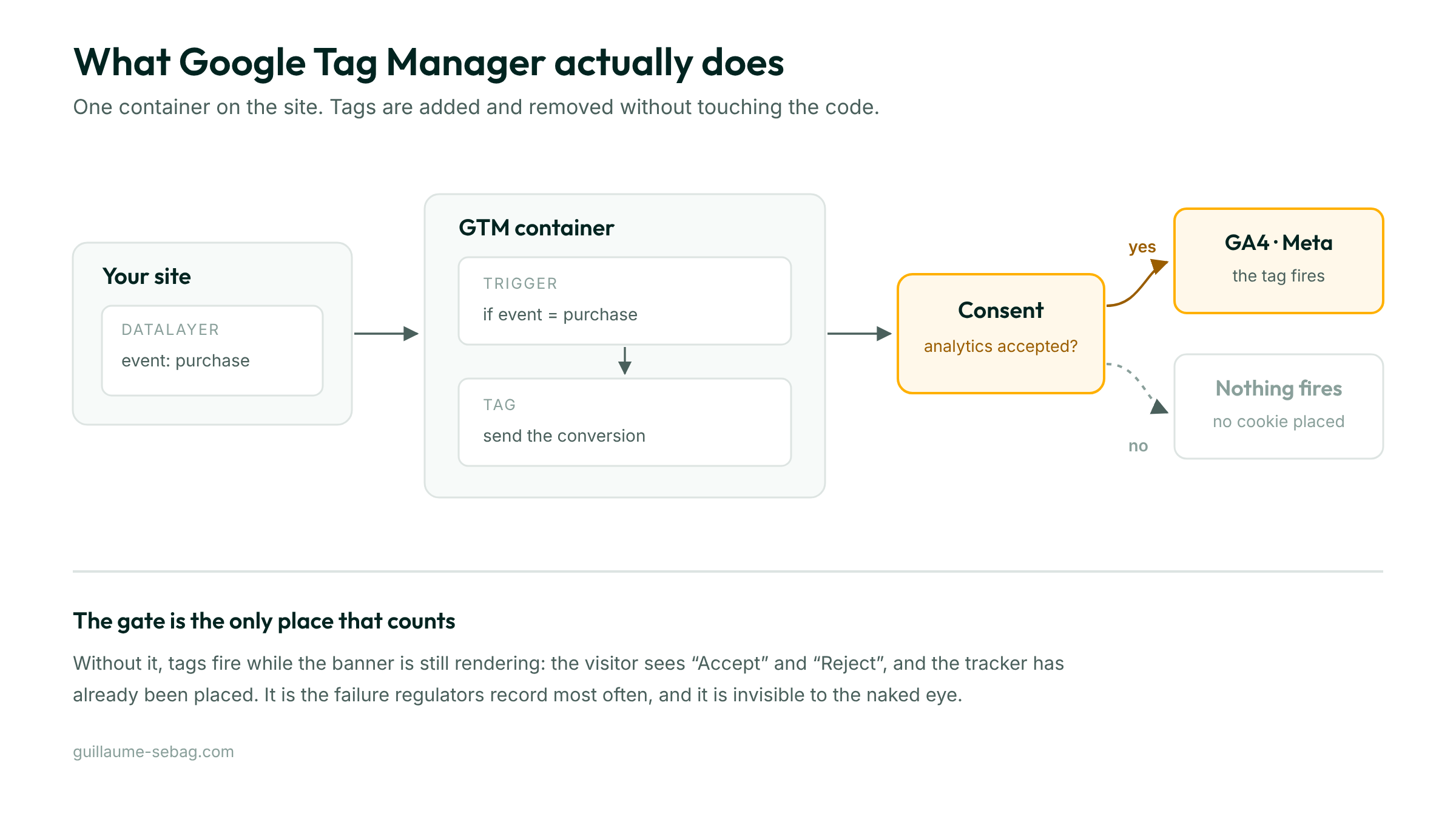
Tag Manager is a switchboard. It waits for something to happen on your site, and when it does, it fires the tools you pointed it at. The meter is Google Analytics. The advertising pixel is Meta or Google Ads. Tag Manager only decides the moment.
Four words to know, and not one more
The whole mechanism rests on four ideas. Here they are, in the order you meet them.
The container is the code on your site. Usually one per site. It is the only thing anyone will ever have to touch in the code, once.
The tag is what runs. “Send a page view to Google Analytics.” “Tell Meta a purchase happened.” A tag does nothing on its own, it waits to be fired.
The trigger is the condition. “When a page loads.” “When this form is submitted.” “When the visitor scrolls 75 percent of the page.” This is where the quality of your measurement is decided, and where most mistakes happen.
The variable is a piece of information that changes. An order value, a page name, a product identifier. It is what turns “someone bought” into “someone bought 240 dollars worth”.
A well built container is that, and nothing else. The rest is accumulation.
The 2023 shift many went through without seeing it
On 1 July 2023, Google stopped processing data in Universal Analytics, the version of Analytics everyone had known for a decade. A year later, from the week of 1 July 2024, access to the interface and to historical data was cut off and the data deleted.
The switch was experienced as paperwork. It was in fact far deeper: Google Analytics 4 no longer thinks in page views and sessions, it thinks in events. Everything is an event, including a page view.
That change of model made Tag Manager more important, not less. In the old world, dropping Analytics on a site produced roughly correct numbers on its own. In the new one, what matters are the events you decide to measure. Deciding them is precisely the work you do in Tag Manager.
The four mistakes that come back every time
I regularly take over containers built by someone else. The same four problems recur, in proportions that barely vary.
Analytics installed twice
By far the most common, and the most treacherous, because the site looks like it is doing beautifully.
Someone places Analytics directly in the site. Later, someone else places it in Tag Manager too, unaware. Every visit is counted twice. Bounce rate collapses, which looks like excellent news. The numbers are wrong, and so is every decision made on them.
The symptom to watch for: an implausibly low bounce rate, somewhere around 1 to 5 percent. Nobody has a site that good.
The landfill container
A tag added for a test, never removed. A trigger named “test2”. Another named “test2 final”. Two years later nobody dares delete anything, because nobody knows what would break.
Google watches this drift too: its help recommends optimising the configuration once the container size indicator passes 70 percent. My own opinion, for what it is worth: a container becomes unmanageable by a human long before it reaches any technical limit.
Conversions assumed rather than tested
A tag is created, it looks right, everyone moves on. Six months later you discover the contact form never reported anything, because it opens a panel instead of loading a new page.
A conversion that has not been tested in real conditions does not exist. That is the rule I apply without exception: I submit the form, I buy something for real, I place the call, and I check the data arrives. It takes an hour and it saves six months of decisions made blind.
Confusing measurement with consent
Google Tag Manager does not make your site compliant. It knows how to respect consent, it does not know how to collect it.
This is poorly understood almost everywhere, so let us be precise. Google consent mode works with four signals: ad_storage for advertising cookies, analytics_storage for measurement, ad_user_data for data passed to advertising, ad_personalization for remarketing. Those signals tell tags what they are allowed to do.
But somebody has to ask the visitor, and above all load nothing until they answer. That is called prior blocking, and it is where most sites cheat: they show a banner while the scripts have already left. The banner then becomes decoration.
There are two ways out of that trap, and I have written a free tool for each. To see what your site actually places before the click, the Chrome extension Cookie Audit replays a first visit and timestamps every cookie. To do the prior blocking on WordPress, the Clear Cookie plugin holds tracking scripts back until the visitor answers.
Since March 2024, consent mode governs access to audience and remarketing features in Google advertising services across the European Economic Area. Getting it wrong is not only a legal exposure, it degrades your campaigns.
Server-side, and who it is really for
For a few years now Google has offered to move tag processing out of the browser and onto a server you control. That is server-side tagging.
The idea: instead of the visitor’s browser talking directly to ten different tools, it talks to one server, which then redistributes. Google’s documentation highlights two benefits, better performance since less code runs on the visitor’s machine, and better control since data passes through an environment you manage.
It is not free, and that is the part people forget to mention. The server runs on Google Cloud. The official documentation quotes roughly 30 to 50 US dollars per server per month once past the free tier, plus networking costs.
My honest opinion: for a brochure site or a small company measuring a few hundred conversions a month, server-side solves a problem they do not have yet. It becomes relevant when volume is real, when script blocking seriously damages measurement, or when data control is a contractual requirement. Before that, it is one more thing to maintain.
What I recommend, in order
Starting from scratch, this order avoids three quarters of the problems above.
One. Check what is already installed on your site, before placing anything. Google’s Tag Assistant extension shows it in seconds, and you may well find a forgotten Analytics.
Two. Place the container, once, on every page.
Three. Wire up the consent mechanism before the first tag. Not after. The order is not a preference, it is what makes prior blocking real.
Four. List your conversions by commercial importance and stop at five. Form, call, booking, purchase, download. Five accurate conversions beat twenty approximate ones.
Five. Test each one in real conditions, one at a time, and write down what you tested and when.
If that list looks right but you would rather have it done, or learn to do it, it is part of my SEO services à la carte.
Six. Document it. One page, not ten. Which tag, for what, fired when. Your future self, or whoever inherits the account, will thank you.
What has not changed since 2012
Google Tag Manager has moved a long way: server-side, consent mode, the shift to an event based model. But the original promise still holds, and that is what explains its longevity.
The power to decide what gets measured belongs to the people who will use the answer. Not to the engineering queue.
That is good news and a trap at once. Good news because the loop between a question and its answer is now measured in hours. A trap because a tool that makes adding easy also makes accumulating easy, and no container has ever tidied itself.
Frequently asked questions
What is Google Tag Manager, in one sentence?
Google Tag Manager is a tag management system: one piece of code on your site lets you add, change or remove your measurement and advertising tools from an interface, without touching the site. It collects no data of its own, it routes.
Does Google Tag Manager replace Google Analytics?
No, and this is the most widespread confusion. Google Analytics measures and stores, Google Tag Manager only fires Analytics at the right moment. The two go together: Tag Manager is the pipe, Analytics is the meter. Without Analytics, Tag Manager will show you no numbers at all.
Is Google Tag Manager free?
The standard version is free, with no traffic limit. Server-side tagging runs on Google Cloud and is billed by usage: Google's documentation quotes roughly 30 to 50 US dollars per server per month beyond the free tier, plus networking costs.
Does Google Tag Manager make my site GDPR compliant?
No. Tag Manager knows how to respect consent, it does not know how to collect it. You need a separate consent mechanism, and above all real prior blocking: until the visitor has chosen, no tag should fire. Google consent mode exists precisely to pass that choice on to the tags.
Do I need a developer to install Google Tag Manager?
For the initial code placement, usually yes, or a plugin if you are on WordPress. That is the one and only time. After that, everything happens in the interface, which is the entire point of the tool.
How many tags can one container hold?
Google publishes no cap on tag count but does watch total container size: its help recommends optimising the configuration once the size indicator passes 70 percent. In practice a container becomes unmanageable long before it reaches any technical limit.